Render Party list field on Entity List's Activity view (Email or Portal Comment view) in PowerApps Portal (D365 Portal).

Hello folks, In the today's article we will learn, 

⇒ How we can render the Party List type field on PowerApps Portal (D365 Portal). 

Sometime we could have a requirement to apply the the Activity view on portal and activity could be of any type like Email/Portal Comment/Task/Appointment etc. Some of these entity contain Party List type field like in Email or in Portal Comment, To and From field is Party List. When we apply the view of entities which contain the party list field, the data in these fields won't render properly. it would comes like this as in below snapshot.

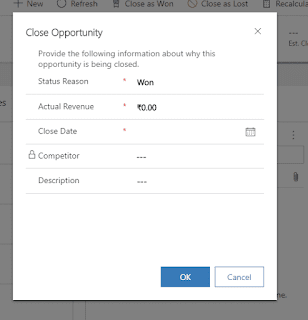
How to Customize / Add Fields / Apply JS / Client Side Validation on Opportunity Close as Won/Lost pop-up in D365 CRM V9.x

Hello folks, Today we will learn, How to customize the Opportunity Close as Won/Lost pop-up window. Sometimes we have requirement to add some more fields to capture more data or to apply client side validation on it.

Remove / Disable / Turn off Multi-factor authentication ( MFA ) in D365 CRM V9.x

Hello Folks, Today we will show you, how we can Turn off / Disable / Remove Multi-factor authentication (MFA) in D365 CRM.


If you purchased your subscription or create a trial after October 21, 2019, and you're prompted for MFA when you sign in, it mean Security Defaults have been automatically enabled for your subscription.
Some times, we have a requirement to turn off this security. This kind of requirement mostly come from a technical developer side. 

Best Way / Latest Way to Connect .Net C# Console Application with D365 CRM V9.x in Visual Studio 2019

Hello folks, Today we will learn the best/latest way to connect our .Net Console Application with D365 CRM V9.x.

There are two ways to connect your .Net console application with D365 CRM.
  1. OrganizationServiceProxy: Oldest way.
  2. CrmServiceClient: Latest way.
In this article, We will learn the latest way (CrmServiceClient). Now follow the below steps:

How to add hyperlink in the row's cell of ag-Grid.

Hello folks, Welcome back to an another tutorial of ag-Grid. Today, We will learn, How to create an hyperlink in cell of ag-Grid.

Prerequisites: 
  • Basic Knowledge of Angular 2 or higher
  • Visual Studio Code
  • Set up of angular environment.
  • Created Table in ag-Grid.

Here i am working on Angular10 Application.

Server Side Sorting in Infinite Row Model in ag-Grid.

Hello folks, Today we will learn, How we can do Sorting in Infinite Scroll Model.
Sorting is not quite simple in this as like in Client-side row model because we do not have all the data, that's why we will use server side sorting in this model. We will again hit the WEB API to get the sorted data.

this is the Part-2 of 'Infinite Row Model' tutorial. If you haven't check part-1 then Click Here
so let's continue our article on Infinite Scroll Model to achieve sorting. 

Infinite row model in ag-Grid with angular, Infinite scrolling and Paging in Infinite Row Model ag-Grid.

Hello folks, Today we will learn, How we can use Infinite row model in ag-Grid. If you do not know about the models in ag-Grid then click here to check my article on it. Today will learn

  • ✔ How to use Infinite row model to increase the performance of application.

  • ✔ How to create a infinite scrolling (Server Side Infinite Scrolling).

  • ✔ How to do pagination (Server Side Paging).


Prerequisites: 
  • Basic Knowledge of Angular 2 or higher
  • Visual Studio Code
  • Set up of angular environment.

Client Side row model in ag-Grid with angular, Sorting and Filtering in ag-Grid

Hello folks, this is my 2nd article over ag-Grid. In this article we will show you

  • How to use Client side row model to show the data in tabular form.
  • How to do sorting and searching.


If you do not know about the models in ag-Grid then click here to check my article on it where we learn about row models and which model is good for our application.

Prerequisites: 
  • Basic Knowledge of Angular 2 or higher
  • Visual Studio Code
  • Set up of angular environment.