Hello Everyone, Today we will learn about Environment Setup for SSIS (SQL Server Integration Services) in Visual Studio 2019 version.

SSIS Tutorial 02- What is SSIS | What is ETL Process
Hello Everyone, Today we will learn about SSIS (SQL Server Integration Services), ETL process, What is the use of SSIS.
We will cover following Topics:- ✔ What is SSIS and ETL Process.
- ✔ Use of SSIS.
SSIS Tutorial 01- Welcome to new SSIS course
Hello Everyone, Welcome to our new SSIS (SQL Server Integration Services) Course series.
Rename the text "Redeem Invitation", "Register", "Sign In", "Redeeming Code", "Sign Out" in PowerApps Portal/ D365 Portal
Hello folks, In the today's article, we are going to learn about some hidden content snippets or we will learn how we can rename the some text in PowerApps Portal/D365 Portal.
Let's rename some below text on portal:
- "Redeem Invitation" to "OTP".
- "Register" to "Sign-up"
- "Sign In" to "Log-in"
- "Redeeming Code" to "OTP"
- "Sign Out" to "Log Out"


Render Party list field on Entity List's Activity view (Email or Portal Comment view) in PowerApps Portal (D365 Portal).
Hello folks, In the today's article we will learn,
⇒ How we can render the Party List type field on PowerApps Portal (D365 Portal).
Sometime we could have a requirement to apply the the Activity view on portal and activity could be of any type like Email/Portal Comment/Task/Appointment etc. Some of these entity contain Party List type field like in Email or in Portal Comment, To and From field is Party List. When we apply the view of entities which contain the party list field, the data in these fields won't render properly. it would comes like this as in below snapshot.

How to Customize / Add Fields / Apply JS / Client Side Validation on Opportunity Close as Won/Lost pop-up in D365 CRM V9.x
Hello folks, Today we will learn, How to customize the Opportunity Close as Won/Lost pop-up window. Sometimes we have requirement to add some more fields to capture more data or to apply client side validation on it.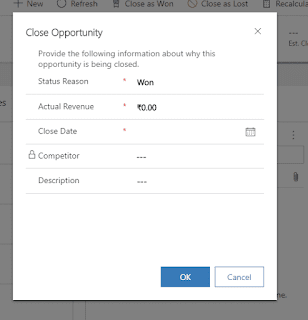
Remove / Disable / Turn off Multi-factor authentication ( MFA ) in D365 CRM V9.x
Hello Folks, Today we will show you, how we can Turn off / Disable / Remove Multi-factor authentication (MFA) in D365 CRM.

If you purchased your subscription or create a trial after October 21, 2019, and you're prompted for MFA when you sign in, it mean Security Defaults have been automatically enabled for your subscription.
Some times, we have a requirement to turn off this security. This kind of requirement mostly come from a technical developer side.
Best Way / Latest Way to Connect .Net C# Console Application with D365 CRM V9.x in Visual Studio 2019
Hello folks, Today we will learn the best/latest way to connect our .Net Console Application with D365 CRM V9.x.
There are two ways to connect your .Net console application with D365 CRM.
- OrganizationServiceProxy: Oldest way.
- CrmServiceClient: Latest way.
In this article, We will learn the latest way (CrmServiceClient). Now follow the below steps:
Subscribe to:
Posts (Atom)